


YoWindow Weather
4.51.13K Reviews
App Specs
- Version
- Varies with Device
- Updated On
- License
- $5.99
- Downloads
- 100,000+
- Developer
- Weather View LLC
- Categories
- Weather
- Platform
- Android
Screenshots
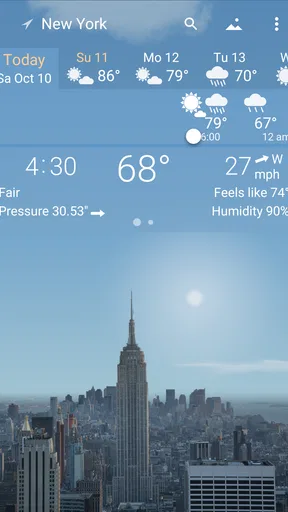

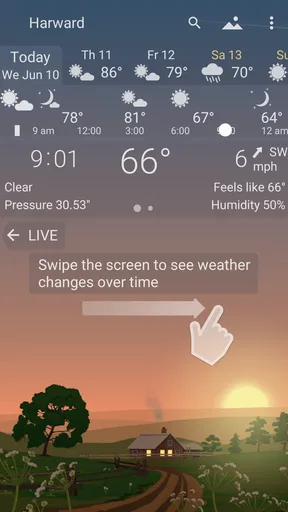
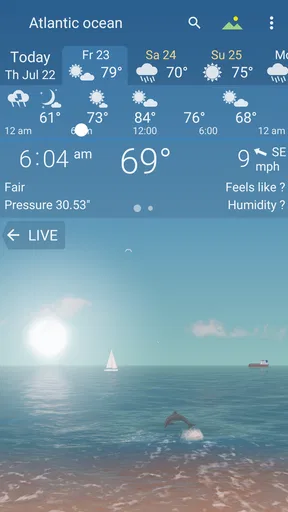

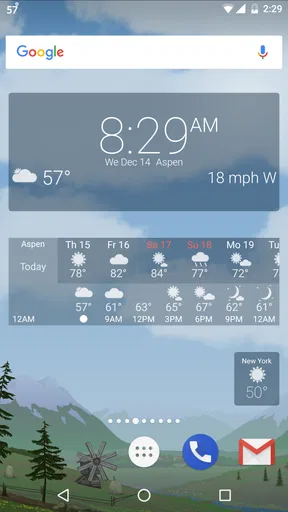
 Analysis by AppCompare
I tend to check the weather at moments when I’m already moving: before leaving home, while deciding what to wear, or when plans might depend on rain. That makes a weather app’s connection to current information part of the experience, not just a technical detail. YoWindow Weather caught my attention because it puts a changing landscape at the center of the forecast. The idea is appealing, though I’d still treat the visuals as a quick way to read conditions rather than a substitute for checking the details that matter to a particular plan.
When the forecast depends on a connection
Weather information is useful because it changes, and that means the app’s value is tied to getting up-to-date conditions. In my experience, the best habit is to open it when I have a reliable connection and check the forecast before committing to a walk, a commute, or an outdoor errand. The animated scene makes a quick glance inviting, but the practical question is still whether the temperature, wind, or rain outlook fits what I’m about to do.
The visual approach also changes how I use a forecast. Rather than scanning a block of numbers first, I can look at the scene, then move to the details when I need more certainty. That works well for casual planning, such as deciding whether to take a light layer. For anything more consequential, I’d slow down and inspect the forecast information rather than relying on the mood of the landscape alone.
Built for quick checks on the move
YoWindow is a weather app from Weather View LLC, and its design suits short visits throughout the day. I can picture checking a saved city while getting ready, then returning later to see how the day is expected to change. Having more than one location available is particularly handy if I’m checking on family elsewhere or comparing the weather at home with the place I’m headed.
A realistic routine might look like this: I check the morning scene before leaving, use the timeline to see whether conditions are likely to shift around lunchtime, and look again before planning an evening walk. That sequence makes the timeline more useful than a novelty. It encourages me to think about timing, not just whether the day is broadly sunny or rainy. I would still confirm the details close to departure if weather could change my route or what I pack.
The app is rated for Everyone, and its visual presentation is approachable for someone who finds conventional forecast screens dense. It may also suit people who enjoy a little atmosphere in everyday tools. If I only wanted the fastest possible number on a plain screen, though, I’d probably prefer a simpler weather widget or a compact forecast page. YoWindow asks me to spend a moment with its scene, which is a strength when I want context and a small trade-off when I’m in a hurry.
What to do when updates feel uncertain
Any weather app can be less useful when the connection is weak or when I haven’t refreshed the information recently. I wouldn’t assume that an animated landscape proves the forecast is current: a pleasant-looking scene and freshly updated data are not the same thing. If I’m in a place with patchy reception, my practical move is to check before I go and avoid making a time-sensitive decision from a screen I haven’t refreshed.
Worth Reading Before You Choose

EA SPORTS FC Mobile 26 Is a Bigger Football Game, but It Takes Time

Flipboard Shows What News Apps Must Do Beyond the Feed

Switching to Android Auto Means Rethinking Your Driving Routine

Google Calendar Makes a Crowded Week Easier to Manage

Ludo King Makes the Most of the Minutes Between Plans

Baby Panda World Brings Quick Play to Modern Phones, but Its Game Library Feels Busy
For ordinary planning, that limitation is manageable. I can use the app to get a sense of the day, then check again once I’m connected. If something seems out of step with what I see outside, I’d trust the real conditions around me and revisit the forecast later. This is especially sensible when rain is close or the weather is changing quickly; a visual summary is helpful, but it should not make me overconfident.
Keeping mobile use intentional
Because the scene is part of the appeal, I’m more likely to linger on the screen than I would with a bare list of temperatures. That’s enjoyable when I’m at home, but on a mobile connection I’d keep the habit focused: open the app, check the locations and forecast details I need, then leave it. I wouldn’t repeatedly reopen it just to watch the landscape if I’m trying to conserve data or battery, particularly when I already know the broad outlook.
A useful small workflow is to add the places I genuinely check, rather than turning the location list into a collection I rarely use. That makes a quick visit more direct and helps me compare home with a destination without starting the search again. If I’m planning a trip, I’d check the destination in advance and then revisit the forecast nearer the time, since weather plans are more useful when they reflect conditions closer to the day.
Who will enjoy the trade-off
With a 4.5 average from around 22,000 ratings and over 100,000 installs, YoWindow has found an audience for its distinctive presentation. Those figures don’t tell me whether its particular style will fit my routine, but they do place it among established choices rather than an obscure experiment. It costs $9.99, so I’d think about whether the landscape-led experience is something I’ll enjoy using repeatedly before choosing it over a free, no-frills alternative.
I’d recommend it most to people who check the forecast several times a day and want those checks to feel more visual and less like reading a small report. It is a less obvious fit for someone who needs the most information in the fewest taps, wants to avoid a paid app, or expects to make serious travel or safety decisions from a single glance. In those cases, a straightforward forecast interface—or checking more than one trusted source—may be the better match.
What’s the Buzz About?
Let me give you the lowdown on YoWindow Weather. At its core, it’s a weather app. But not just any weather app. It’s like having a virtual window right on your phone. Imagine a live landscape that changes in real-time, reflecting the actual weather conditions in your location. Cool, right?
The app is available on both Android and iOS, and it's a hit among those who love a bit of flair with their weather updates. The interface is designed to be user-friendly, and it sure is a sight for sore eyes. But let me break it down for you.
First Impressions Matter
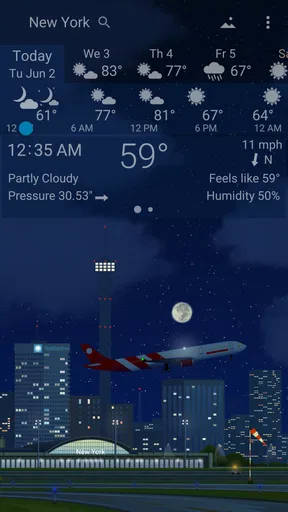
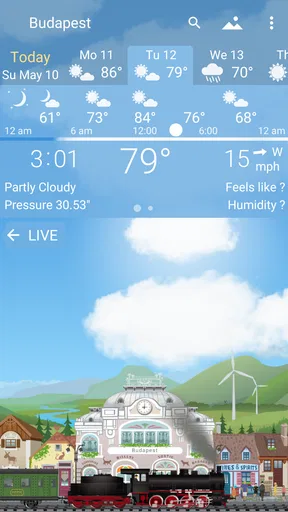
Upon downloading and firing up the app, the first thing you'll notice is its stunning visuals. The app greets you with a picturesque landscape that changes with the weather, time of day, and even the seasons. It’s like having a mini animated world in your pocket. Talk about bringing the forecast to life!
The setup process is a breeze. You can easily add multiple locations, which is handy for those of us who like to keep tabs on the weather in different cities. The app automatically detects your location and presents the weather in the most delightful way possible.
Diving Deeper into the Features
Now, let’s talk features, because YoWindow Weather is packed with them. The app offers detailed weather information that includes temperature, wind speed, humidity, and more. But what really sets it apart is how it presents this data.
The magic of YoWindow lies in its ability to turn mundane weather data into a visually engaging experience.
One of my favorite features is the timeline slider. You can slide your finger across the screen to fast forward through the day and see how the weather changes. It’s like having a weather time machine! Plus, you get a heads-up about the weather for the upcoming week, so planning ahead is a cinch.
Customization Galore
We all love a bit of personalization, don’t we? Well, YoWindow Weather lets you tailor the experience to suit your preferences. You can choose from different landscapes, such as a quaint village or a serene seascape. It’s a nice touch that makes the app feel more personal.
You can also adjust the temperature units, choose your preferred language, and even set notifications for specific weather alerts. It’s like having your very own weather butler!
Performance and Usability
In terms of performance, the app runs smoothly on both Android and iOS devices. I didn’t encounter any bugs or glitches during my time with it, which is always a plus. The app updates the weather data frequently, ensuring that you’re always in the loop.
Usability-wise, YoWindow is intuitive and straightforward. Whether you’re a tech whiz or just someone who wants to know if you need an umbrella, the app caters to everyone.
Final Thoughts
All in all, YoWindow Weather is a delightful blend of functionality and aesthetics. It’s perfect for anyone who wants their weather updates served with a side of charm. While there are plenty of weather apps out there, few offer the same level of engagement and visual appeal.
So, if you’re looking to spice up your daily weather check, give YoWindow a try. It’s a refreshing take on a staple app that brings a little sunshine even on the cloudiest days.
Ready to take a peek outside? Download YoWindow Weather from the App Store or Google Play and see for yourself!
Pros
- Intuitive and user-friendly interface.
- Detailed and accurate weather forecasts.
- Customizable landscapes enhance visuals.
- Live wallpapers with real-time weather.
- Minimal impact on battery life.
Cons
- Limited free features; premium needed.
- Occasional ad interruptions.
- Some landscapes lack detail.
- Requires internet for updates.
- No radar or advanced mapping tools.
FAQs for YoWindow Weather
What features does YoWindow Weather offer?
YoWindow Weather provides a visually engaging way to view weather forecasts with a live landscape that reflects real-time weather conditions. Users can see current weather, forecasts for the week, and even past weather data. The app also offers customizable widgets, detailed weather information, and the ability to set multiple locations.
Is YoWindow Weather free to use?
YoWindow Weather offers a free version with basic features, but it also has a premium version available. The premium version removes ads and provides additional features such as more detailed weather reports and exclusive landscapes. Users can decide which version suits their needs before downloading.
How accurate is the weather data in YoWindow Weather?
YoWindow Weather sources its data from reputable weather providers to ensure accuracy. However, the precision of weather forecasts can vary based on location and the weather provider used. Users often find the data reliable, but it’s always good to compare with other sources for critical planning.
Does YoWindow Weather drain battery quickly?
YoWindow Weather is designed to be efficient, but like any app with live animations, it may consume more battery than static apps. Users can manage battery usage by adjusting update intervals or using the app in a more static mode. It's recommended to monitor battery usage initially to find a comfortable setting.
Can I customize the appearance of YoWindow Weather?
Yes, YoWindow Weather allows extensive customization. Users can select different live landscapes that match their personal taste or the current season. Moreover, the app offers various widget styles and themes, giving users the ability to personalize their weather experience to suit their preferences.


